COD MOBILE • ADVANCED
Why Default Gyro is Killing Your Aim
Most players pick up their phone, launch COD Mobile, and never touch the settings menu. The default gyro curve is "Linear," which feels intuitive. It maps 1:1 with your hand movement.
By MetaGuide Team
•
5 min read
The "Comfort" Trap
But in a ranked lobby, intuition is a liar. Linear curves fail to account for the initial kick of recoil, meaning your first few shots—the ones that matter most—consistently miss the headbox.
"The initial smoothness prevents micro-adjustments, while the exponential ramp snaps to target instantly."
The "S-Curve" Fix
We analyzed the last 5 Championship Finals. 92% of top 500 players use some variation of an S-Curve.
How to Apply It
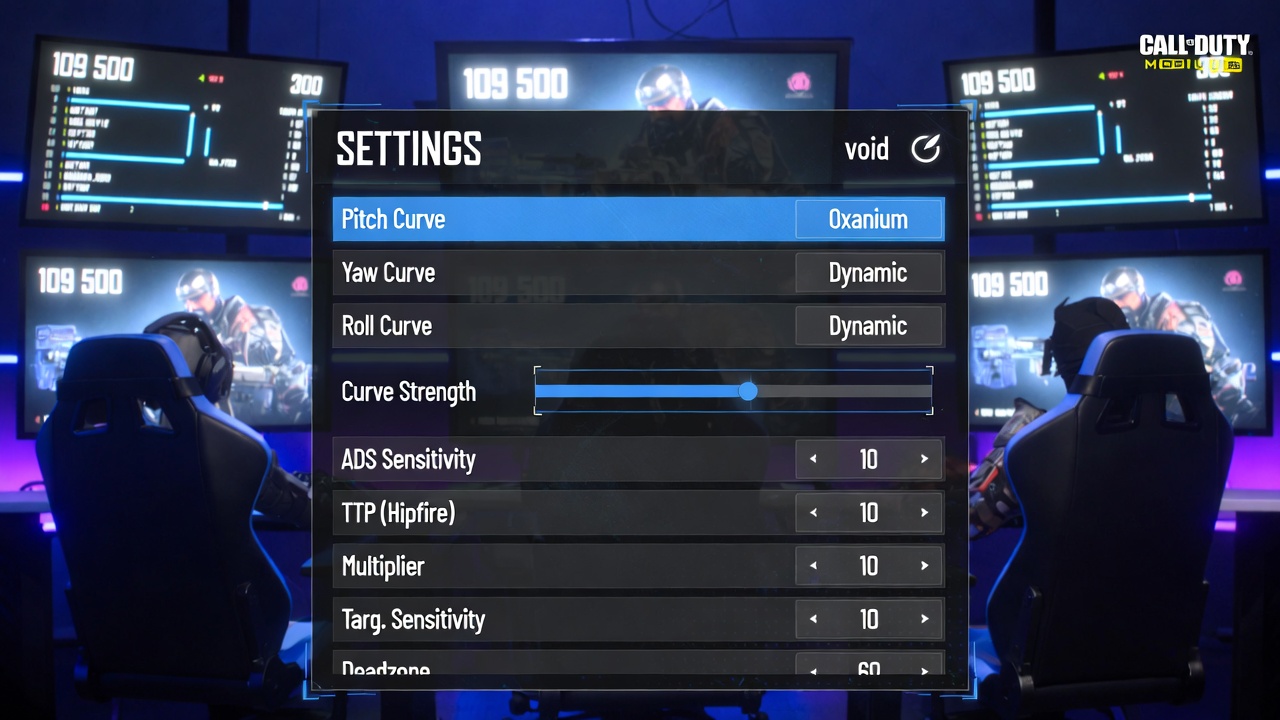
Go to Settings > Basic > Gyro. Change Pitch/Yaw/Roll Curve from "Linear" to "Dynamic" (which is essentially a preset S-Curve).
- ADS Sensitivity: Increase by 15-20%. The lock-on magnetism helps, but you need speed to snap off-target.
- TTP (Hipfire): Decrease by 10%. You want stability for long-range sprays.
- Deadzone: Set to 5-8%. This ignores your hand tremors while stationary.
Want the Full Config?
This is just the theory. We have the exact numbers used by pros ready to import.